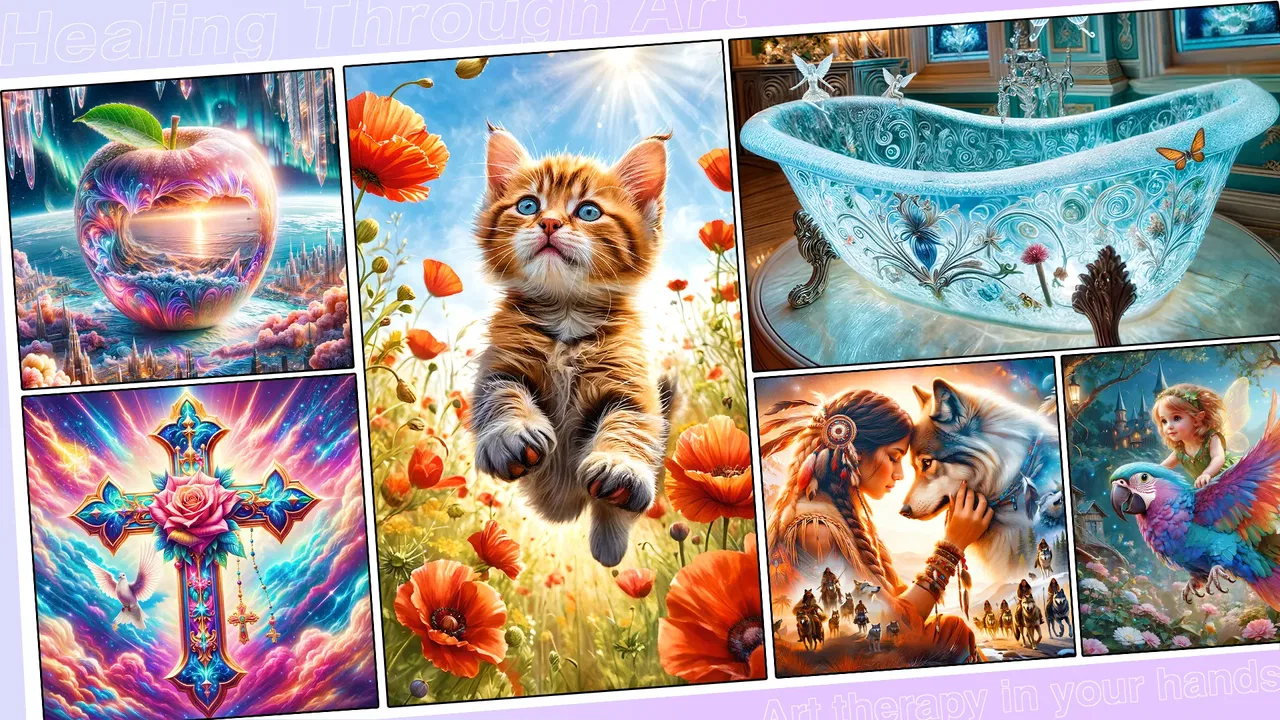
Color Master - Color by Number
- 4.7
- Rating
- 5.00M
- Installs
- Free
- Price

 Analysis by App-foxy
I opened Color Master - Color by Number expecting a simple way to fill a few pictures during spare moments, and that is still its strongest appeal. It is a free board game from Coloring Game Studio@RabiGame, built around coloring artwork by number rather than competing against another player. The basic idea is easy to understand: choose an image, match each numbered area with its color, and gradually turn a blank design into a finished picture.
That simplicity matters. I can use it when I want something quieter than a traditional game, but more focused than endlessly scrolling through short videos. The app is aimed at Everyone, works on Android 6.0 and later, and its current version is 2.17.0. It has reached over 5 million installs and holds a 4.7 average from around 47 thousand ratings, which suggests that the relaxed coloring format has found a substantial audience.
My recommendation depends less on whether you like board games in general and more on what you want from one. If you enjoy completing visual collections, need a low-pressure activity, or like small tasks with a visible result, this is an easy game to understand. If you want strategy, competition, a story, or a deep creative drawing tool, I would look elsewhere.
You May Also Like

 Blood Strike: 2.5 Anniversary
Blood Strike’s Loadouts Turn Every Drop Into a Tactical Gamble
A close look at Blood Strike’s custom loadouts: how fast access to signature weapons reshapes its battle royale rhythm, rewards preparation, and narrows the gap between fights.

 Pandora - Music & Podcasts
Pandora’s Music Is Easy to Start, but Harder to Recover
Pandora’s strength is its low-effort path from a seed to a station. Its weak spot is how much confidence it asks you to place in connection, setup, and quiet recovery.

 8 Ball Pool
 Is Built on Rivalries, Rematches, and Routine
A close look at the rivalries, rematches, shared routines, and unanswered safety questions that turn a quick pool match into a persistent mobile community.

 Samsung Music
’s Quiet Strength Is Playing What You Already Own
Its reach comes less from spectacle than from dependable access to a personal library. That simplicity is both the app’s strongest retention engine and its ceiling.

 AccuWeather: Weather Radar
AccuWeather Review: A Quick, Clear Forecast for Everyday Decisions
For everyday plans, the best forecast is the one you can understand quickly. AccuWeather makes rain timing, radar, and local conditions easy to act on, with a few trade-offs.

 Hill Climb Racing
Why Hill Climb Racing Still Turns Crashes Into One More Run
A tiny car, a bumpy hill and one more upgrade: Hill Climb Racing keeps resurfacing because its simple chaos makes every near-miss feel personal.
More From Our News Desk



How I judged the coloring experience
The first decision point is the kind of attention you want to give the game. Color-by-number play is not completely passive: I have to inspect the picture, locate the matching number, and tap the correct regions. At the same time, it does not demand the planning or quick reactions associated with chess, card battles, or timed puzzle games. That middle ground makes it useful for a short break, especially when I want my hands occupied without feeling pressured to win.
The second criterion is variety. The store summary presents more than 20,000 pieces of art, so the appeal is clearly built around a large amount of coloring content rather than a small set of handmade levels. I would not judge every image by the same standard. Some players will enjoy moving through many designs quickly, while others may prefer a smaller catalog with more elaborate artistic control. The important question is whether you like the rhythm of repeated completion.
I also pay attention to how much control the game gives me. A number-based system provides direction, which is helpful when I do not feel creative enough to choose a palette myself. It also means the finished image follows the app's intended design. I can relax into the process, but I am not really painting from a blank canvas. That trade-off is central: guided coloring is easier and less intimidating than freehand art, yet it offers less personal expression.
For me, the best test is an everyday situation. Imagine waiting for an appointment with only a few minutes available. A competitive game may be awkward because stopping halfway through a match can be inconvenient. A long-form puzzle may require more concentration than I have available. Here, I can open a picture, complete a handful of areas, and put the phone away. That makes the format practical, although the experience is most satisfying when I am willing to settle into a longer sequence of small taps.
The strongest part is the low-pressure loop
The game works because each action is immediately understandable. I do not need to learn a complicated ruleset before starting. I look for the next numbered section, choose its corresponding color, and watch the artwork become clearer. That steady visual progress gives me a small reason to continue without introducing the frustration of losing a life, missing a turn, or falling behind another player.
I find this particularly useful late in the evening, when I want an activity that is more engaging than a static picture but less demanding than a strategy game. The finished image also gives the session a natural stopping point. Instead of asking myself whether I should play one more competitive round, I can decide to complete one more section or finish the current artwork.
There is a subtle advantage in the numbered format for people who normally avoid art apps. Freehand drawing can make me worry about whether the result looks good. Here, the design already supplies the structure, so I can concentrate on completion rather than skill. That makes it suitable for beginners, casual players, and anyone who enjoys visual organization more than artistic experimentation.
Large content works best with a personal routine
A catalog of this size can be exciting at first, but it can also create choice overload. When I have thousands of possible pictures in front of me, browsing can become a distraction from coloring. My practical solution is to choose a small theme for each session, such as animals, patterns, or landscapes, and stop browsing once I find a picture that matches my mood. This keeps the app feeling like a relaxing game instead of an endless gallery.
Another useful habit is to treat difficult-looking pictures as longer projects rather than trying to finish them in one sitting. I start with the larger, obvious areas, then return to the tiny sections when I have more patience. That approach reduces the visual clutter that can appear in detailed designs and gives me progress even when I only have a few minutes.
The app's ability to sync across devices is valuable here. If I begin on one device and continue on another, the point is not merely convenience; it changes how I can fit the game into my day. I might start a picture during a commute and continue later at home. I would still make sure the same account or synchronization setup is active before relying on that workflow, because unfinished progress is the last thing I want to discover after changing devices.
Where the game wins against familiar alternatives
Compared with traditional board games, this is much easier to start alone. There is no need to find another player, set up a board, or remember a complex strategy. It also avoids the competitive tension that can make some games unsuitable for quiet moments. If my goal is to decompress rather than test my judgment, the coloring format is a better match than a head-to-head board game.
Compared with freehand drawing apps, it removes the blank-page problem. I do not have to select every color, sketch an outline, or learn digital brush controls before producing something recognizable. That makes it more approachable, especially when I want a reliable result. The cost of that convenience is that my creative decisions are narrower. I am following a prepared design rather than making an original illustration.
Compared with ordinary puzzle games, the reward is visual completion instead of solving a logic problem. I am not trying to discover a hidden rule or optimize a move sequence. The challenge is mainly maintaining attention while locating the right areas. That can feel wonderfully calming, but players who need intellectual difficulty may find the loop too repetitive after the novelty wears off.
Compared with a digital coloring book, the numbered structure gives me a clearer task. I am less likely to stare at a blank image wondering where to begin. On the other hand, a conventional coloring app may be better for someone who wants to experiment with unusual color combinations or create a personal interpretation of an image. I would choose this game for guided relaxation, not for serious digital art practice.
Small frictions that affect the decision
The main limitation is repetition. Once I understand the loop, the interaction remains fundamentally the same: identify, tap, and complete. A large art library can extend the experience, but it does not automatically add new kinds of play. If I need evolving mechanics, narrative progress, or increasingly complex strategy, a different board or puzzle game will probably hold my attention longer.
Precision can also matter in detailed pictures. Small numbered areas may require careful tapping, and a relaxing activity becomes less relaxing if I repeatedly miss the intended section. I prefer using a larger screen when possible, especially for intricate artwork. On a phone, the experience is convenient, but the trade-off is that tiny zones can feel more fiddly.
The free entry point is helpful, but the game includes in-app purchases ranging from $0.49 to $69.99 per item. That broad range is worth considering before spending. I would begin without buying anything and first decide whether I genuinely enjoy the basic routine. For a casual player, the free experience may be enough; for someone who wants to invest heavily in the catalog or optional conveniences, the potential spending deserves a personal limit.
I also would not confuse a high rating with a guarantee that every image or session will suit me. The overall 4.7 average and roughly 4.3 thousand written reviews indicate strong reception, but my own tolerance for repetitive tapping is more important than the headline number. A player who loves collecting finished pictures may find the volume excellent, while someone who becomes bored with repeated gestures may reach the limit quickly.
Who should choose it, and when switching makes sense
I would choose this game for a person who wants an accessible, solitary activity with clear progress. It is a good fit for short breaks, quiet evenings, and moments when concentration is available but competition is not appealing. It can also suit families looking for an Everyone-rated game that is easy to explain, although each person may enjoy it for a different reason: one player may like the artwork, another the completion loop, and another the simple controls.
I would be more cautious recommending it to someone buying an app primarily for creative freedom. The numbered system guides the experience so strongly that it is closer to completing a visual puzzle than producing independent artwork. A free drawing tool or a more open coloring app would be a better choice if brush selection, original composition, and personal color decisions are the priority.
I would also steer competitive players toward a conventional board game instead. This title does not replace the social tension of taking turns with friends or the satisfaction of outthinking an opponent. Its strength is the absence of that pressure. Switching from a competitive game to this one makes sense when I want to rest; switching from this one to a strategy game makes sense when I want challenge and interaction.
The cost of switching is low in terms of learning. I can move from this game to another coloring app without carrying over complicated rules, but I may lose the familiarity of the existing artwork collection and any progress connected to the current device setup. That is why I would not switch merely because the first few pictures feel simple. I would switch when the underlying activity no longer matches what I want, not because I expected it to become a different genre.
For someone worried about device changes, the sync feature makes continued use more practical than starting over on each device. I would set it up early, before building a large collection of completed work. For someone worried about spending, I would treat the free price as an opportunity to test the habit rather than an invitation to purchase immediately. The right question is whether the game earns a regular place in my routine without requiring extras.
My practical way to get more from it
I get the most from the game when I use it deliberately. I choose one picture instead of browsing endlessly, set a natural stopping point, and leave the most detailed sections for a time when I am not rushed. This turns the huge catalog into a manageable queue. It also helps me notice whether I am enjoying the activity itself or merely chasing the next completed image.
For a shared household device, I would keep synchronization in mind before anyone starts switching between phones or tablets. The feature can support continuity, but only if I use it consistently. I would also avoid making purchases until I understand how often I return to the game. A small purchase may feel harmless, yet the listed range reaches from cents to a much larger individual item, so a simple spending boundary is sensible.
One less obvious use is as a transition activity. I can play for a short period before bed, after work, or between demanding tasks as a way to change mental pace. It is not a treatment for stress, and I would not present it as one, but the predictable sequence can provide a gentler break than an intense game. That benefit disappears if I turn the enormous artwork catalog into another source of pressure, so I keep the goal modest: complete a little, enjoy the image, and stop.
Color Master - Color by Number is at its best when I accept its limits. It is not trying to be a full art studio, a competitive board game, or a deep puzzle campaign. It offers guided coloring, a large amount of artwork, and a straightforward way to make a few quiet minutes feel more purposeful. The developer, Coloring Game Studio@RabiGame, has focused the experience on accessibility rather than complexity, and that focus is clear from the first session.
My final recommendation is positive for casual players who like visual collections and relaxing, repeatable tasks. I would download it if I wanted a free board-style game for solo breaks and was comfortable with optional purchases in the range of $0.49 to $69.99. I would skip it if I needed competition, substantial strategy, or unrestricted artistic control. For the right player, the best reason to try it is the dependable sense of progress without the pressure to win; for the wrong player, that same predictability will be the reason to move on.
With an Everyone rating, support for Android 6.0 and later, and a current release numbered 2.17.0, it is easy to approach on compatible devices. I would start free, test a few different artwork styles, enable synchronization before changing devices, and judge the game by how naturally it fits into my day. If I find myself looking forward to completing one more picture rather than forcing myself through it, then this is a worthwhile addition to my casual game collection.
FAQs for Color Master - Color by Number
01What is Color Master - Color by Number?
Color Master - Color by Number is a digital coloring app that allows users to color various artworks with ease. By following a simple number guide, users can fill in intricate designs without needing advanced artistic skills. It’s suitable for all ages and is designed to provide a relaxing and enjoyable experience.
02Is Color Master - Color by Number available for both Android and iOS?
Yes, Color Master - Color by Number is available for download on both Android and iOS platforms. You can easily find it on the Google Play Store for Android devices and the App Store for iOS devices. Make sure your device meets the minimum system requirements for optimal performance.
03Are there any in-app purchases or ads in Color Master?
Color Master - Color by Number offers both free and premium content. While you can enjoy many features without spending money, there are in-app purchases available for additional designs and tools. Additionally, the app may display ads, which can be removed through a subscription or one-time purchase.
04Can I use Color Master offline?
Color Master - Color by Number requires an internet connection for downloading new content and updates. However, once the artwork is downloaded, you can enjoy coloring offline. This makes it convenient to use the app in areas without internet access, as long as you have pre-downloaded content.
05Is Color Master suitable for children?
Yes, Color Master - Color by Number is designed to be kid-friendly and suitable for all ages. The app includes a variety of artworks that appeal to children, and the simple number-guided system makes it easy for them to use. Parental guidance is advised for managing in-app purchases.
Pros
- Wide range of color palettes available.
- Intuitive and user-friendly interface.
- Excellent stress-relief tool.
- Frequent updates with new designs.
- Offline mode for coloring anywhere.
Cons
- Contains ads that can interrupt flow.
- Limited free designs without subscription.
- Some colors hard to differentiate.
- Occasional lag on older devices.
- In-app purchases can be costly.

Color Master - Color by Number
Gallery